
How to record a loan
A loan is money you owe, not money you earned. When the loan lands, your cash goes up and what you owe goes up by the same amount, so your Profit and Loss does not change. Each payment then has two parts: principal, which pays down what you owe, and interest, which is an expense.
In BooksGPT that means one liability account for the loan, with the interest split out of each payment. Then the loan ties to the lender's statement to the penny.
1. Create the loan account
A new BooksGPT chart starts with Loans Payable (code 2500). Use it as is, rename it, or add one account per loan. If the loan is connected to BooksGPT, it already has its own account: skip the rest of this step and use that account in steps 2 and 3.
- Open All pages in the left sidebar, then click Accounting and Chart of accounts, then Add account.
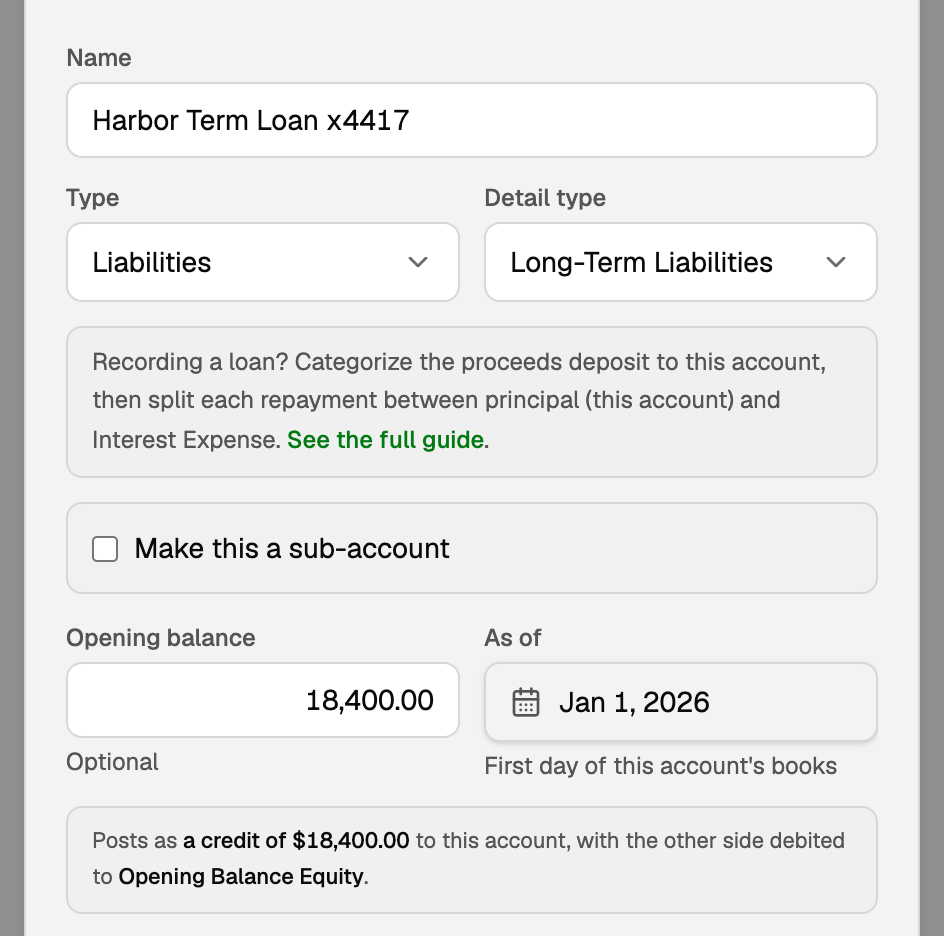
- Name it, with the last four digits of the loan number at the end, for example "Harbor Term Loan x4417".
- Set Type to Liabilities and Detail type to Long-Term Liabilities.
- Click Add.
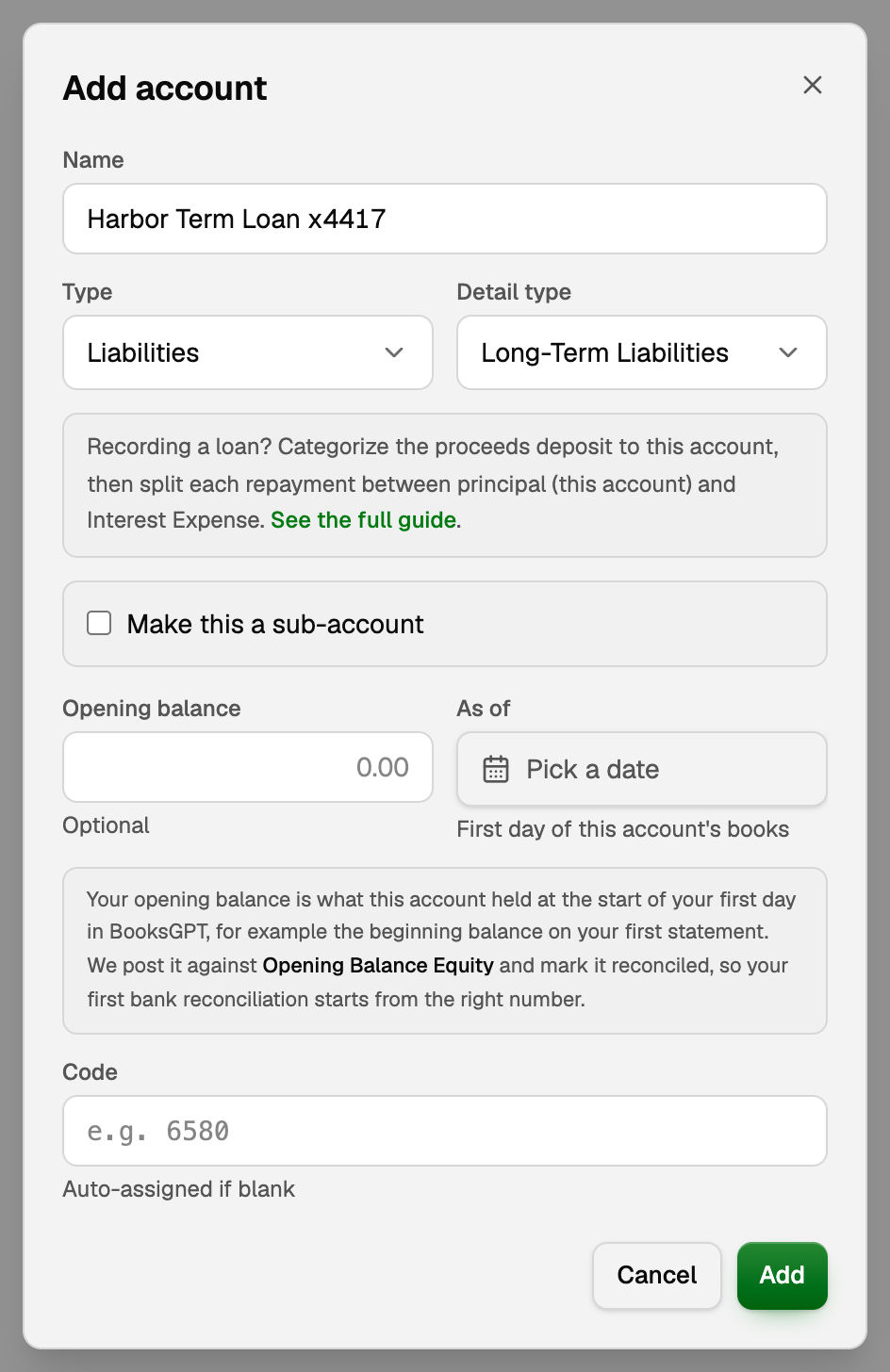
You can also create the account from the category picker in step 2.
2. File the loan deposit to the loan account
When the loan money lands in checking, the deposit waits in the Review inbox.
- Open the deposit's category picker and choose the loan account.
- No loan account yet? Type its name in the picker and click New category at the bottom of the list. Under What kind? pick Loan or debt, leave Long-term loan selected, and click Create category. The deposit is filed to it.
- Approve the row as you would any other.
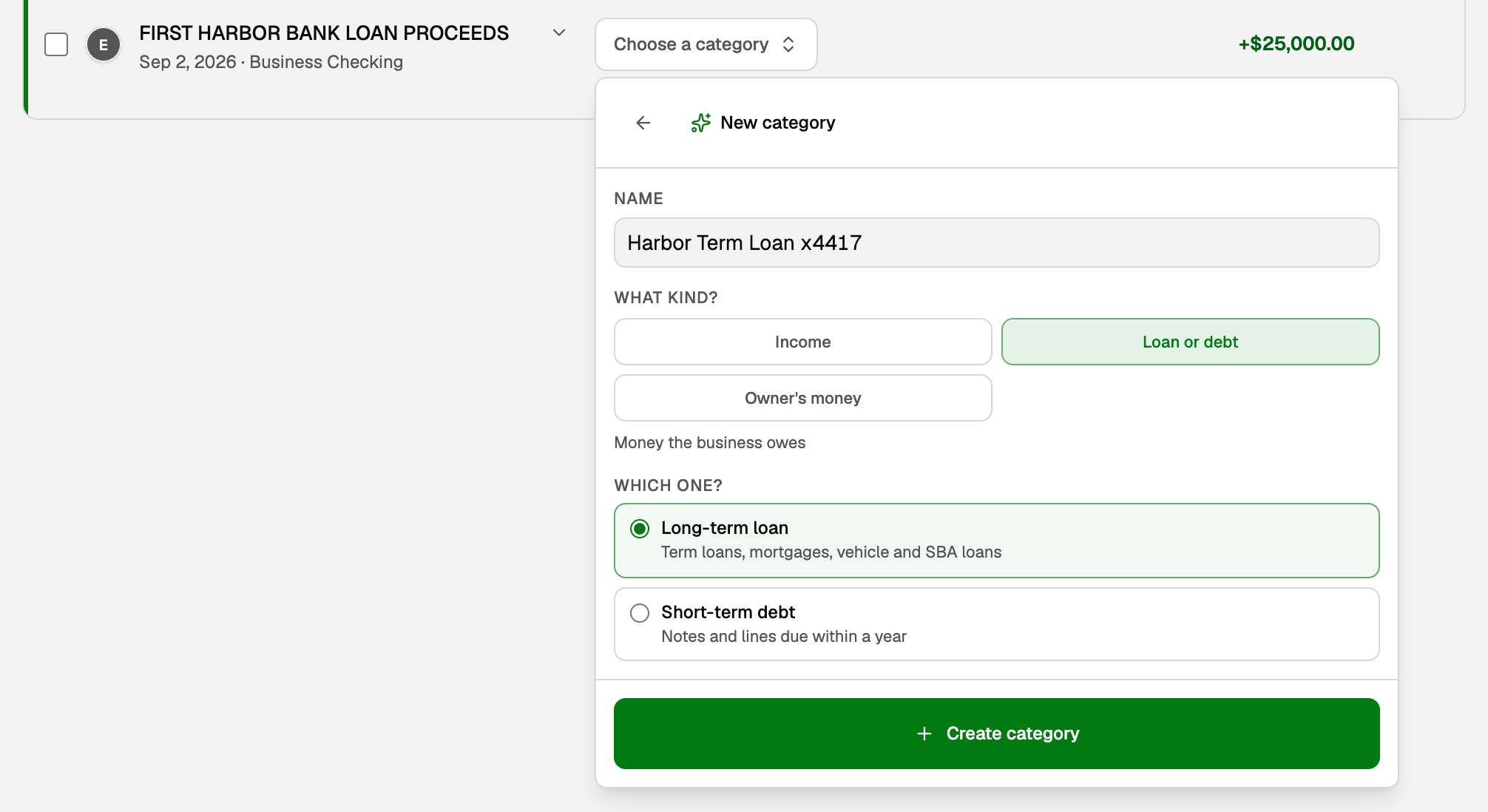
Never file the deposit to income, and skip the picker's Create income category row: borrowed money is not revenue. Checking goes up by $25,000.00, and so does the loan.
3. Record the interest on each payment
There are three ways to split out the interest. Use one way for each payment, never two, or the interest is counted twice.
The easy way: upload the lender's statement
- File the whole payment to the loan account, the same way as the deposit. Do not split it.
- Open All pages, then click Setup and Import, then Upload a statement. Drop the lender's statement on the box.
- On the statement's card, check the Loan and the Interest amount, and pick the expense account beside it (Interest Expense, 6350 in the starter chart). The card offers it again for that loan next time.
- Click Record interest.
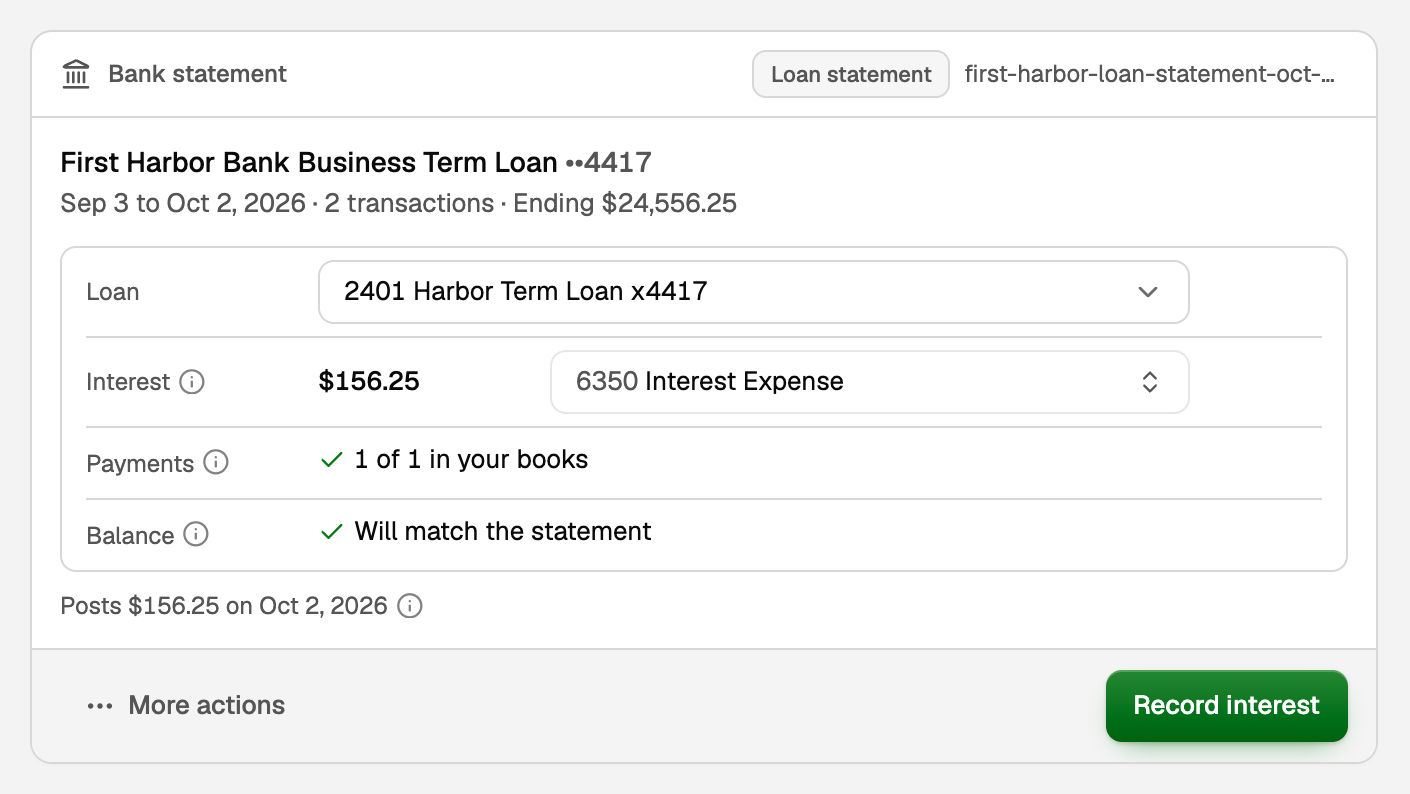
Record interest posts one journal entry on the statement's closing date: interest expense goes up, and the loan goes up by the same amount. Your payment already took the full amount off the loan, so adding the interest back leaves it lower by exactly the principal.
- Payments says how many of the statement's payments are already in your books. The card never adds them again.
- Balance says whether the loan will match the statement.
- If the card finds the interest already in your books, or asks you to confirm it is not, check that entry first: recording it again counts the interest twice.
- To take it back, open the entry, click More, then Reverse entry.
Statement not here yet? Post an estimate first
A monthly recurring journal entry books your estimate, and the statement corrects it later.
- File each whole payment to the loan account, as above.
- Open All pages, then click Accounting and Journal entries. Click the Recurring tab, then New recurring entry.
- Add two lines for your estimate of one month's interest (the interest only, not the whole payment): the interest expense account as a debit, and the loan as a credit.
- Tick Adjust to the loan's statement, pick Monthly and a Starts on date, then click Create recurring entry.
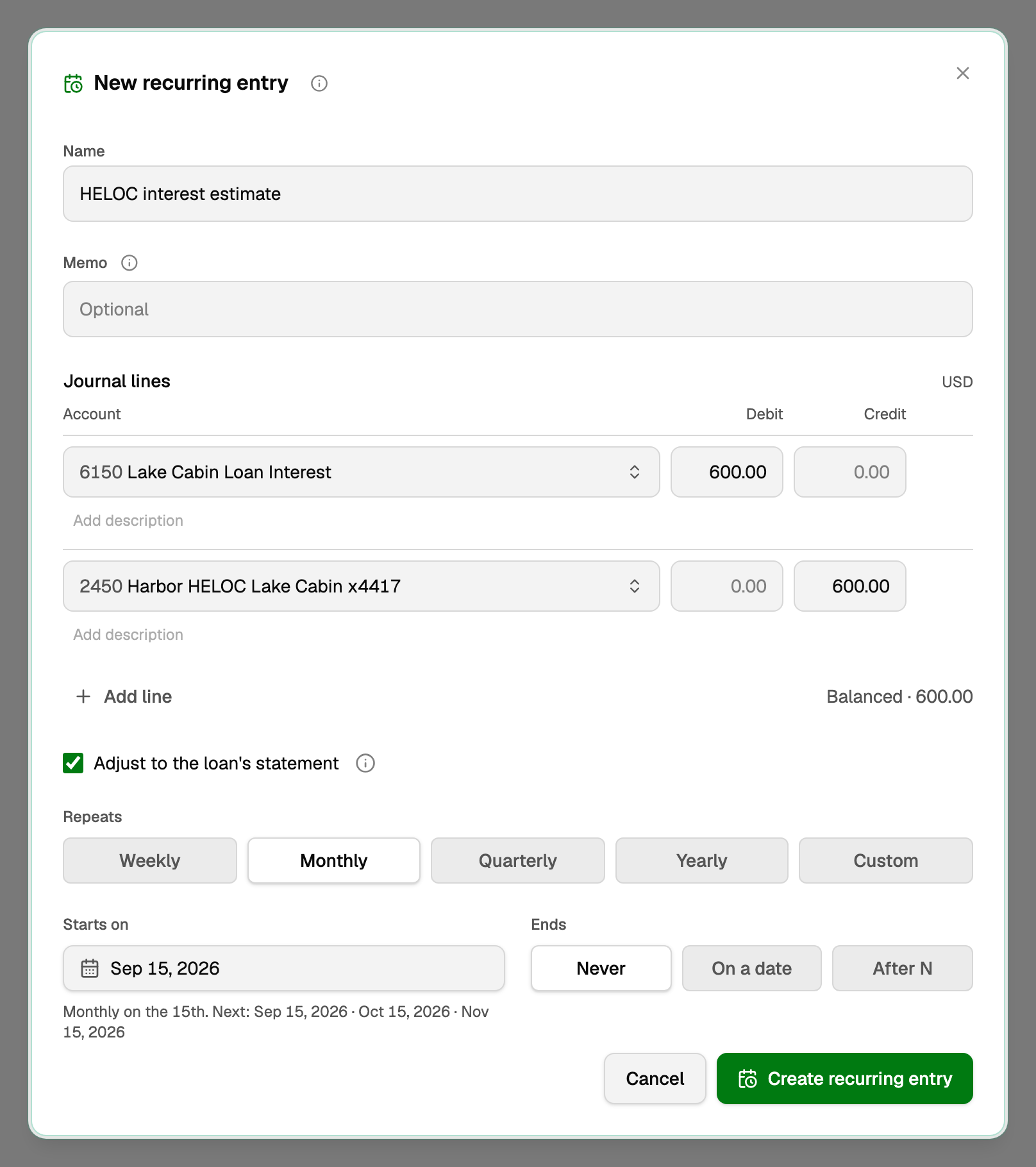
When the statement arrives, upload it as above. Its card offers Adjust entry, which changes that month's entry to what the statement charged. Next month's entry still posts your estimate, and Undo adjustment puts the estimate back. Pick a day well inside the lender's statement period, so each statement covers exactly one of these entries.
No statement at all? Split the payment by hand
Use the lender's amortization schedule for the two amounts.
- Open the payment and click Split transaction.
- On the first line, enter the principal and pick the loan account.
- On the second line, enter the interest and pick Interest Expense.
- Click Save split. More in "Split one transaction across categories".
The result
Whichever way you use, a $600.00 payment with $156.25 of interest:
- Takes $443.75, the principal, off the loan.
- Takes the full $600.00 out of checking.
- Puts $156.25 of interest expense on your Profit and Loss.
4. If the loan is connected to BooksGPT
A connected loan already has its own loan account. Use that account in every step, and do not add another.
- Most loan connections bring only the loan's balance, not each payment. File each payment from checking to the loan account and record the interest as in step 3.
- If the connection does bring each payment onto the loan account, pair the checking payment with it as a transfer instead of filing both, or the payment counts twice.
- A connected line of credit works like a credit card: pair each payment from checking as a transfer, and file its interest charge to Interest Expense. See "Transfers, credit-card payments, and owner draws".
5. Starting mid-loan? Set an opening balance
If your books start partway through a loan, enter what you owed at the start of your first day in BooksGPT, such as the beginning balance on the lender's statement, in Opening balance, with that day in As of, on the Add account form. BooksGPT books it against Opening Balance Equity. For an account you already have, see "Set an account's opening balance".
6. Check it against the lender's statement
- Click the loan account in Chart of accounts to open its register and see the balance after each payment.
- Use Reconcile on the loan account to tie it to the statement, the same way you reconcile a bank account.
Updated on: 17/10/2026
Thank you!