
Read the General Ledger
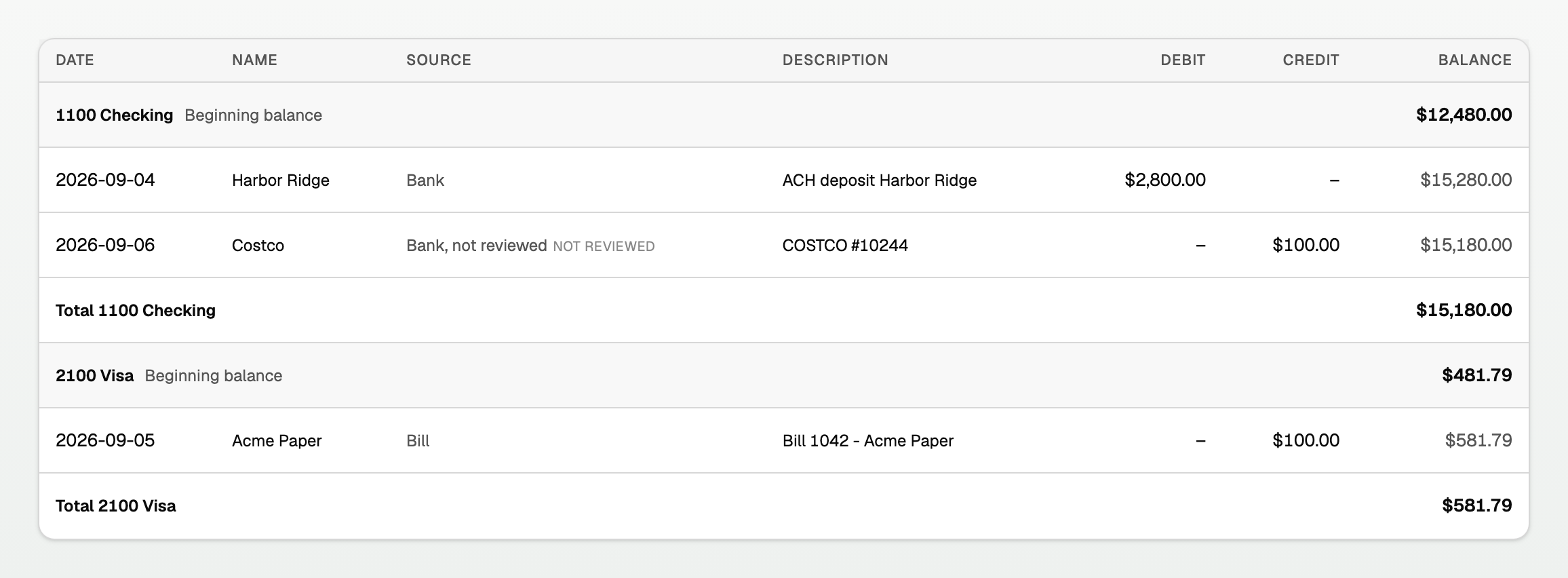
The General Ledger is every posted journal line in a date range, one account at a time. Each account opens at its Beginning balance, each line under it runs that account's own Balance, and the account closes at its own total.
Open the General Ledger
- Open All pages in the left sidebar, then under Reports click General ledger.
- The page title is General Ledger.
- Set Report period.
- Switch Accounting basis between Accrual and Cash.
How each account reads
- The account's code and name sit on their own row, with Beginning balance.
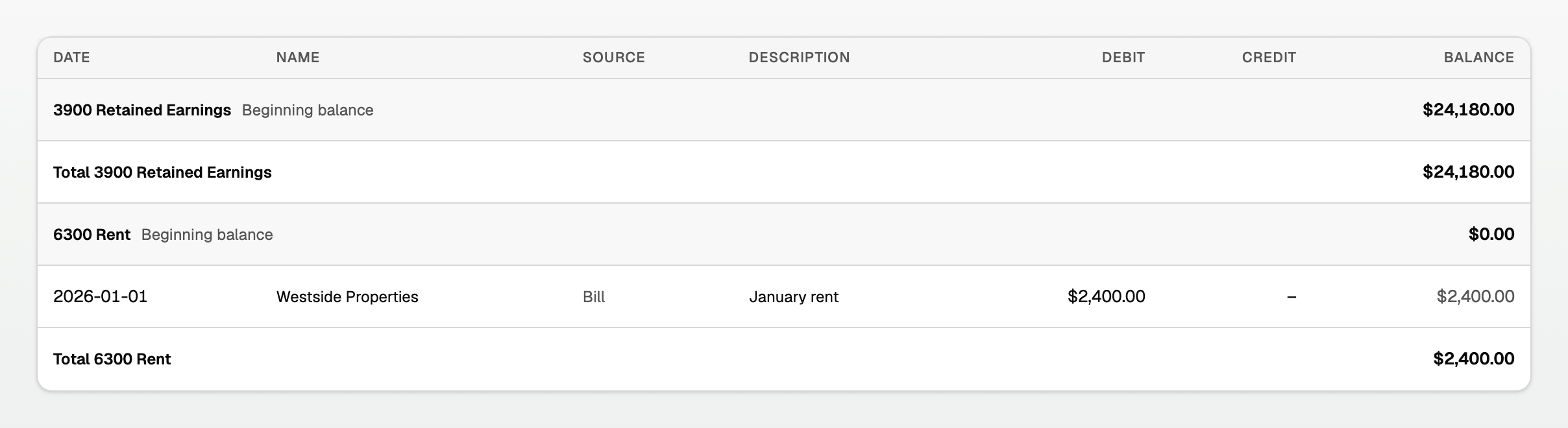
- For an asset, liability, or equity account, that figure is as of the day before the range. For income and expense, it is this fiscal year's total so far: $0.00 on a full-year report, January through February on a March report. Earlier years sit on Retained Earnings, same as the Balance Sheet.
- Every line under that row belongs to that account. Balance is that account's balance after the line.
- Total {account} closes the account at the same figure the Balance Sheet (or Profit & loss) prints for it.
Keep your place while you scroll
- The column headings stay at the top as you scroll down.
- The account you are reading stays pinned under them, with its Beginning balance, until the next account's heading takes over.
- On a phone or a narrow window, the ledger scrolls sideways in its own box. The account name stays on the left. A faint shading at an edge means more columns that way.
An account with no lines this period
- An account that carried a balance in and had no activity still prints: its heading, its Beginning balance, and its Total, with no lines between them. That is the ordinary shape of Retained Earnings.
The columns
- Date is the posting date used by the selected basis.
- Name is who the money moved with. It is blank when nothing names one.
- Source says what created the line, in words: Bank, Invoice, Bill, Journal, Opening. A bank row nobody has filed yet reads Bank, not reviewed. Inventory lines read Opening inventory, Inventory purchase, Cost of goods sold, Landed cost, or Inventory cost update.
- Description is the line's memo.
- Debit and Credit show the money as posted. The empty side shows a dash.
- Balance is this account's running balance. A credit card you owe $581.79 on prints $581.79, not ($581.79), so the column ties to the Balance Sheet.
Read one account
- Open Account balances. See "Account balances, income by customer, and purchases by vendor".
- Click the account's name.
- The General Ledger opens with a Filtered to account banner naming it.
When a total is not final
An amber line under the title names money the report cannot see.

- The line reads N transactions worth $X are not in these numbers yet.
- Those are bank rows with no journal entry, so they sit in no account.
- Click the line to open To review.
Good to know
- Export this report downloads Excel or CSV. Print or save as PDF gives you a copy.
- For one account's rows with receipts and reconciliation marks, use its register instead. See "Open an account register".
Updated on: 24/09/2026
Thank you!