
Fix or change a transaction's category
A category is the account that says what money was for: Office Supplies, Rent, Sales. It decides which line of your profit and loss a transaction lands on, so a wrong category puts money on the wrong line.
Changing a category moves only that side of the transaction. The bank side stays exactly as it was, so your bank balance never changes, and a reconciled statement stays reconciled.
Change one category
- Open All pages in the left sidebar, then click Daily work and Transactions.
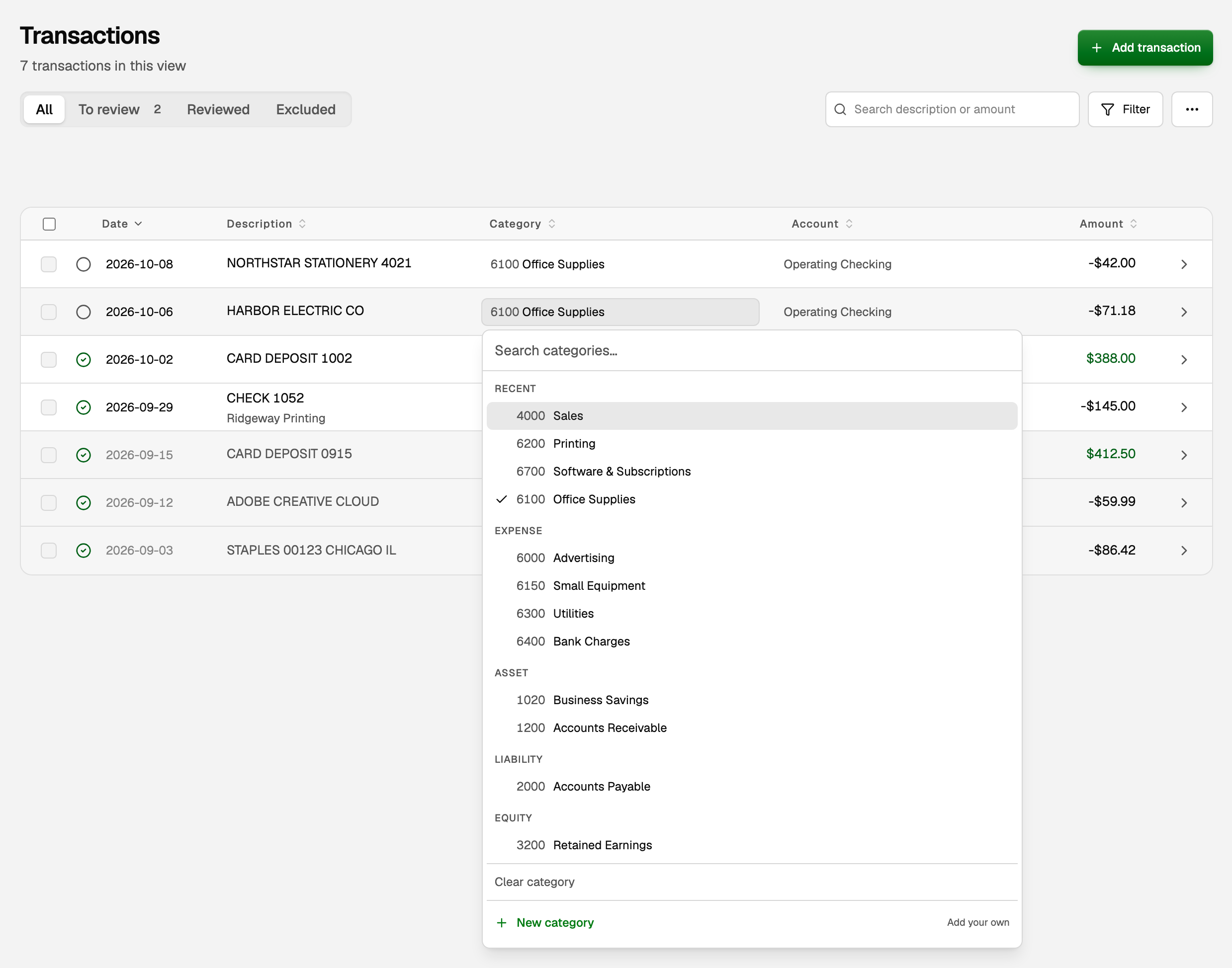
- Click the transaction's category and pick the right one. It saves as soon as you pick.
- Click the empty circle beside the date (Mark reviewed). It becomes a green check. Until then, reports keep a transaction waiting for review under Uncategorized.
On a phone, tap the transaction to open it, change Category, tick Mark as reviewed, and tap Save.
Change many at once
- Tick the checkbox on each transaction.
- Click the pencil icon in the bar above the list, Bulk edit.
- Pick a category under Set category, then click Apply to N.
- With the rows still ticked, click the check mark, Verify, to file the ones waiting for review.
Any that can't change keep their category, and the message afterwards says why.
Fix it from the Profit and Loss
Use this when a report shows money on the wrong line, such as a parent account holding money that belongs on one of its sub-accounts.
- Open All pages, then click Reports and Profit & loss.
- Click the account's line. A window titled with the account lists the Lines behind this figure. They add up to the amount you clicked.
- Click a bank transaction. Its editor opens beside the list. Change Category, make sure Mark as reviewed is ticked, and click Save.
An invoice, bill or journal entry opens on its own page in a new tab. Fix it there.
A transaction split across accounts
Books brought in from QuickBooks or another program can split one bank transaction across several accounts. Its Category then reads Split across 2 accounts (or however many).
- Open the transaction and scroll to its split lines. Each line has its own category.
- Pick the new category on the line you want to move.
- Click Save. Only that line moves. Its amount stays, and so does the bank line.
To split a transaction yourself, see Split one transaction across categories.
A reconciled transaction
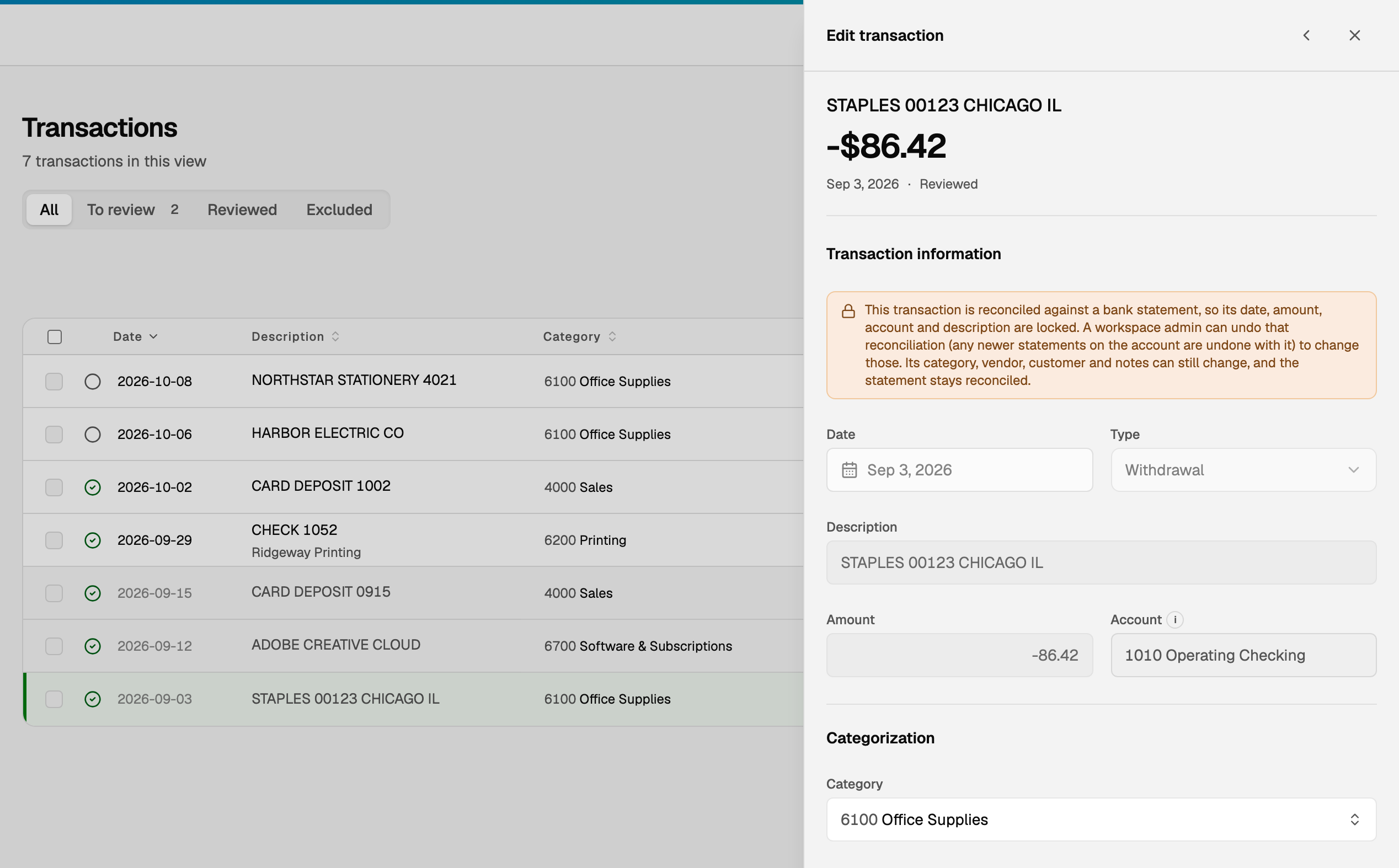
Change its category the same way, in the register or in the transaction's details. The bank line stays as the statement showed it, so the statement stays reconciled.
- The date, amount, account and description stay locked, because the bank statement proved them. The note at the top of the transaction says so.
- A payment to your credit card is a transfer, not an expense. Choose the card under Transfers in the category list.
- To change a locked field, a workspace admin undoes the reconciliation first. See Reconcile a bank or credit card account.
If something goes wrong
When a change will not save, BooksGPT says why at the top of the transaction. The common reasons:
- The books are closed for that date. The transaction is read only until someone reopens that period. See Close the books for a month or year.
- It is matched to a bill or invoice. Its category belongs to that document, so change it there. The note names the document.
- The date, amount or description will not save. A transaction from a previous bank connection keeps the bank's original details. Leave them as they are, and write any clarification in Notes.
Lots of transactions with no category at all? Open All pages, then click Daily work and Banking. Under Needs attention, click Re-run AI on N uncategorized and BooksGPT suggests categories for them. It never overwrites a category you chose yourself.
Updated on: 19/10/2026
Thank you!