
Reconcile a bank or credit card account
Reconciling means checking your books against your bank's statement, line by line. Every transaction the bank printed should be in your books exactly once, and when you have ticked them all, your balance and the bank's agree to the penny.
It is how you know your books are complete and nothing is counted twice. It is also the first thing an accountant checks at tax time. Do it once a month for each bank and credit card account, when the statement arrives.
How the numbers work
The worksheet does one sum for you:
- It starts from the Beginning balance: everything already reconciled on the account, which is where your last reconciliation ended.
- Each payment you tick comes off, and each deposit you tick is added. The result is the Cleared balance.
- That is compared with the Statement ending balance printed on your statement. The gap is the Difference.
When the Difference is $0.00, every line on the statement is accounted for in your books.
Start a reconciliation
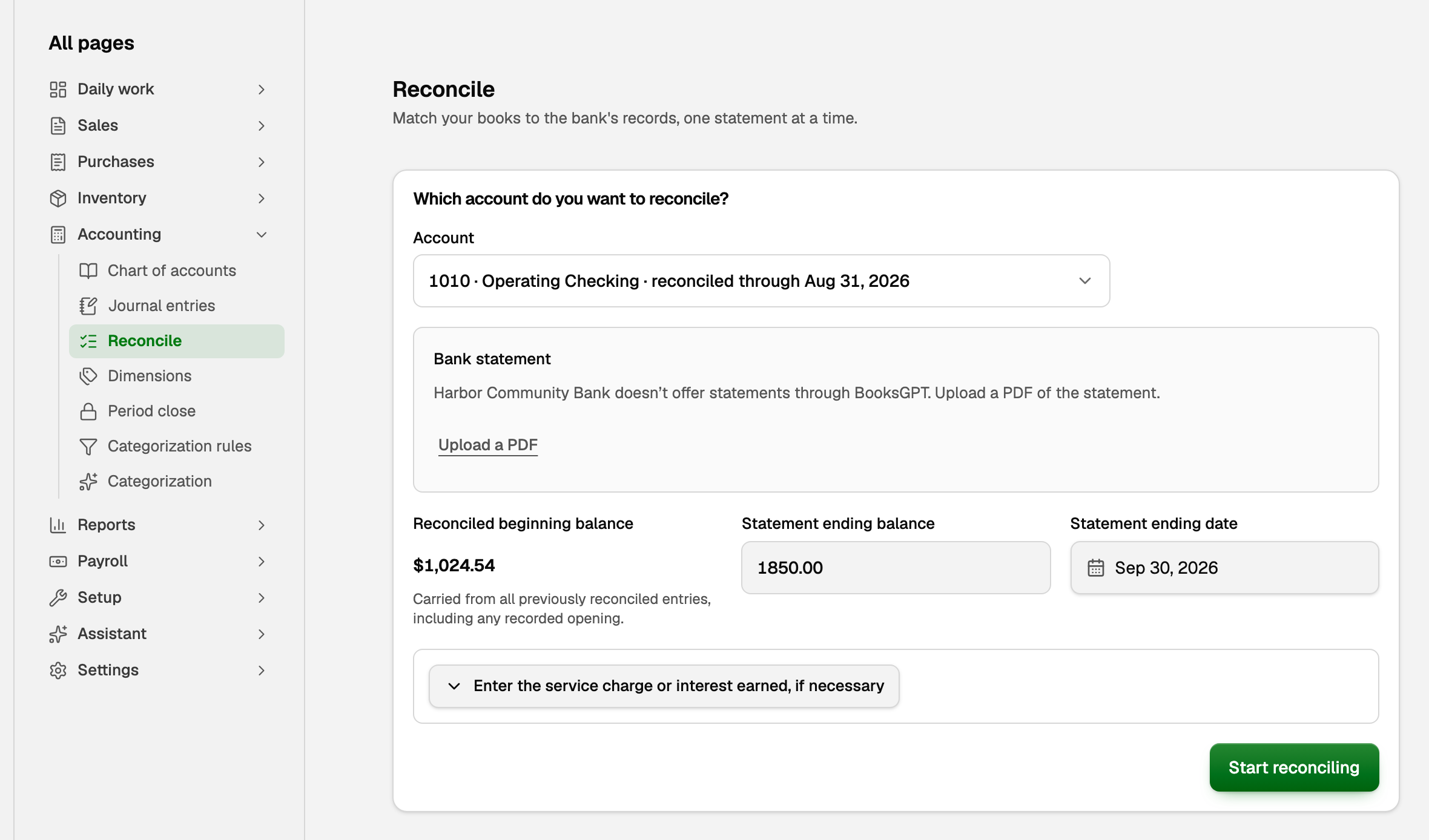
- Open All pages in the left sidebar, then click Accounting and Reconcile.
- Under Which account do you want to reconcile?, pick the account.
- Type the Statement ending balance and Statement ending date from the statement. Or click Upload a PDF, and BooksGPT reads both from the statement for you.
- Click Start reconciling.
Reconciled beginning balance fills itself in from everything already reconciled on the account, including an opening balance you recorded. You never type it.
If nothing on the account is reconciled yet, as after importing your books, it starts at $0.00. Reconcile once through a date you have already checked with your bank: enter that date and the bank's balance on it, click Start reconciling, then Clear all and Finish now. Each statement after that starts where the last one ended.
Tick what is on the statement
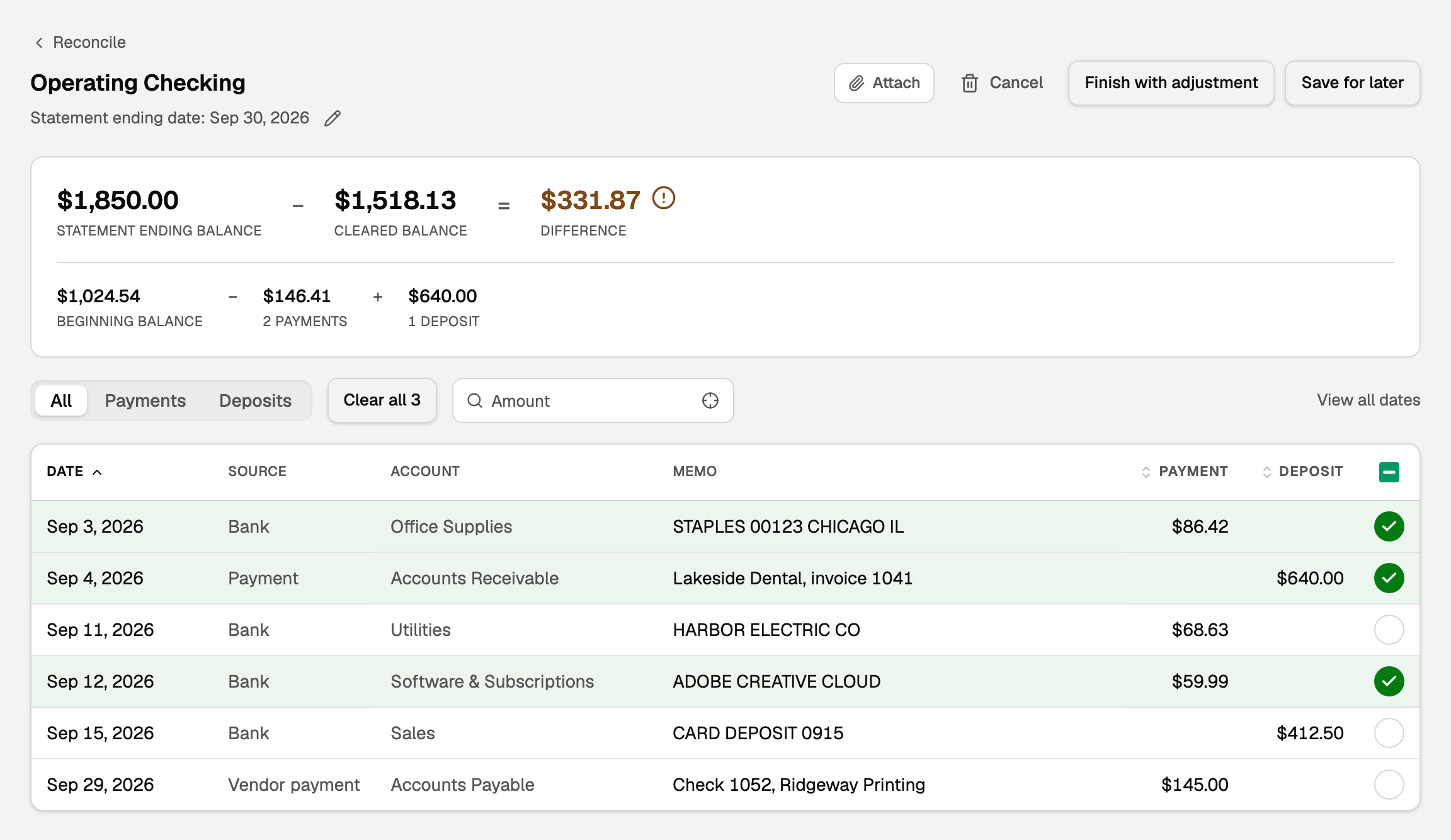
- Go down the statement. For each line, find the same transaction in the worksheet and tick it. The Difference moves as you go.
- Leave a transaction unticked when the statement does not show it, such as a check that has not cleared yet. It belongs on next month's statement.
- When the Difference reaches $0.00, click Finish now.
A few things make it quicker:
- Every tick saves as you go. Click Save for later and come back anytime.
- Clear all ticks everything listed through the statement date, except a check that hasn't printed. It is handy for a catch-up; then untick anything the statement does not show.
- Type an amount in the Amount box to find a transaction fast.
Let BooksGPT match an uploaded statement
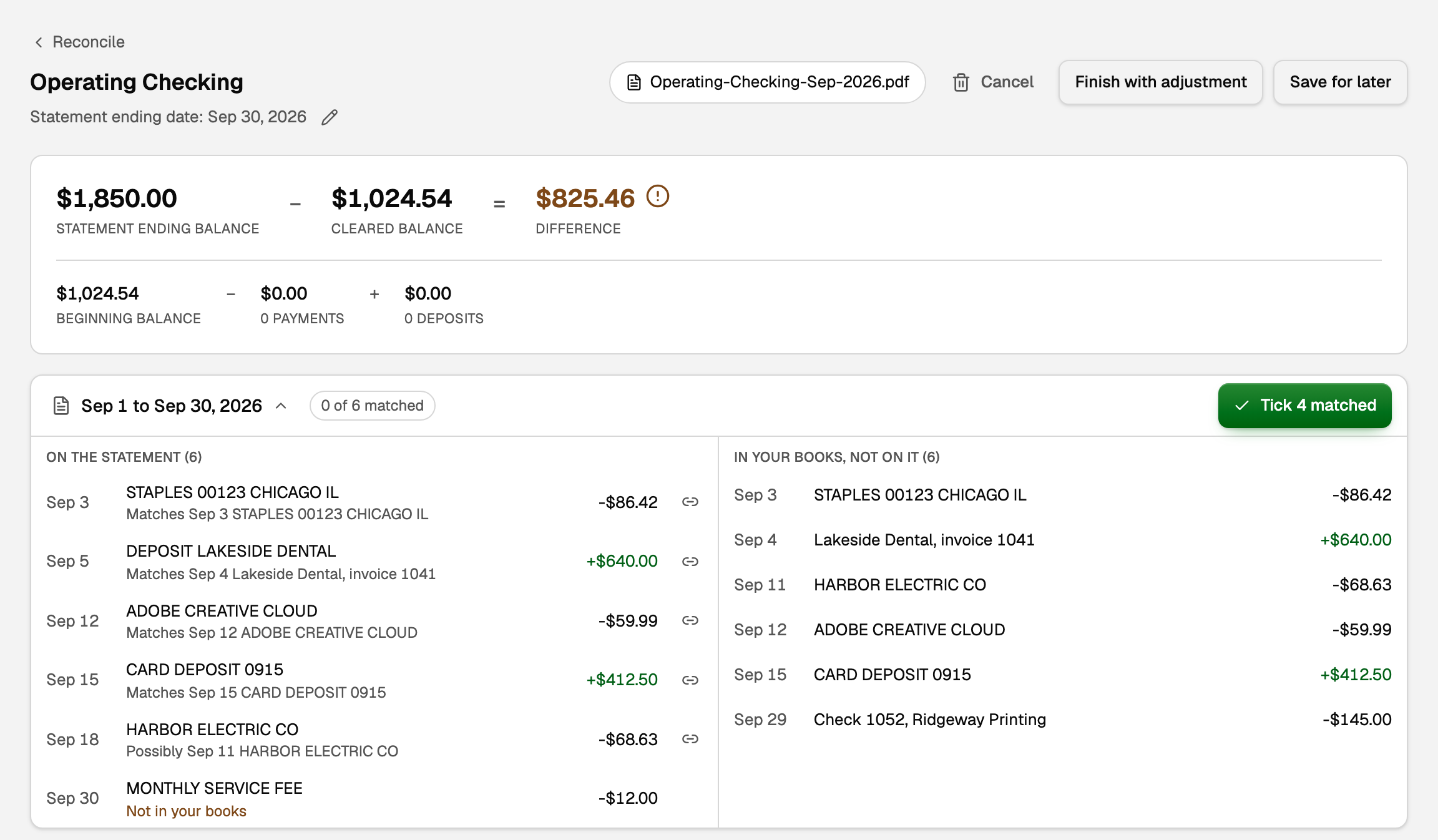
When you start from an uploaded statement, a panel under the Difference lists the statement's own lines beside your transactions, so you never work from a PDF in another window.
- Click Tick 4 matched to tick every transaction BooksGPT matched to a statement line. The number is how many it matched.
- For any line left over, drag it onto its transaction, or click the line and then the transaction.
- A line marked Not in your books has no transaction of that amount yet. See "The difference won't reach zero" below.
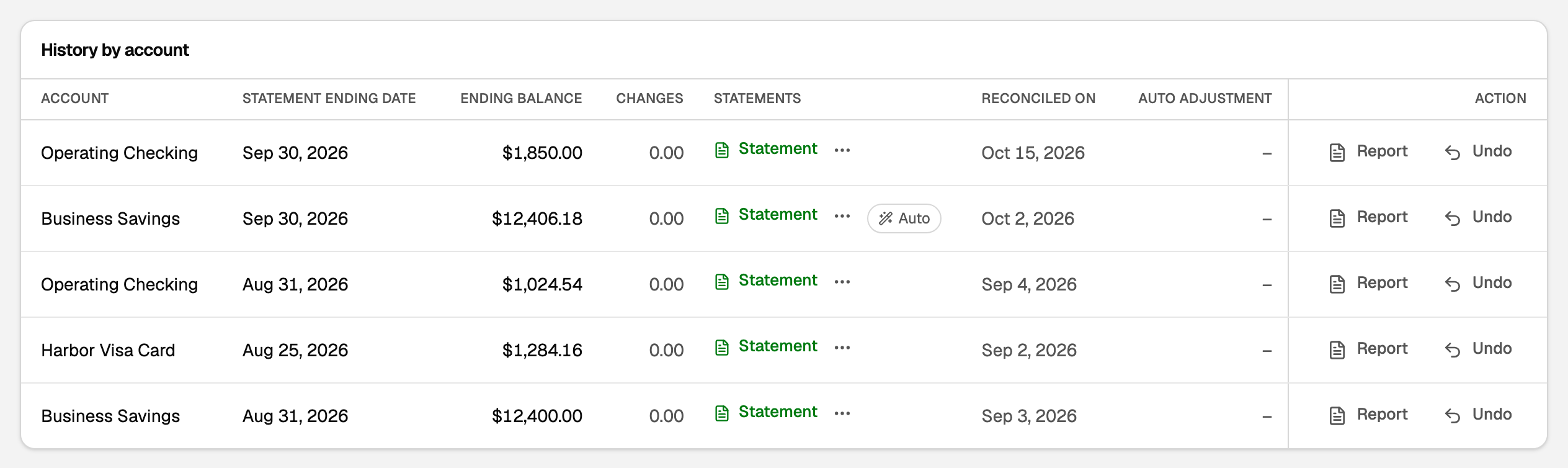
When every line on an uploaded statement is already in your books and the totals tie, BooksGPT reconciles it for you and marks it Auto. Upload a bank statement explains how.
What your books say now
- Each ticked transaction is reconciled. On Transactions, open Filter and turn on Show reconciled to see a green R beside them.
- The account is reconciled through the statement date, and next month's reconciliation starts from this ending balance.
- The statement is listed under History by account on the Reconcile page. Click Report for the record to keep, or to send your accountant.
- A reconciled transaction's date, amount, account and description are locked, because the bank proved them. You can still change its category, and the statement stays reconciled. See Fix or change a transaction's category.
A payment from checking to your credit card is a transfer, and it shows on both statements, so you tick it on each account's worksheet. See Transfers, credit-card payments, and owner draws.
If something goes wrong
The difference won't reach zero
Look at the amount of the difference first. It usually points straight at the problem.
- A transaction is missing from your books. First check the Review inbox: a bank row On hold, or a credit card payment not yet filed as a transfer, stays off the worksheet until you post it. Add a transaction only when it is truly missing, such as a bank fee, interest or a check you never entered. Then tick it.
- A transaction is in your books twice. The same payment brought in from two places, for example. Tick only one, then delete or exclude the copy on Transactions.
- A transaction is not ticked. Click the crosshair in the Amount box (Find the difference) to show every transaction of exactly the difference, and look for one that is not ticked. If your books date it a few days after the statement ends, BooksGPT offers to show it: tick it only if the statement includes it. A difference of twice one transaction's amount often means it was recorded as a deposit instead of a payment, or the other way round.
- The statement figures are wrong. Click the pencil beside Statement ending date (Edit statement) to fix the ending date or balance. You do not have to start over.
- The beginning balance is not the one printed on your statement. On a first reconciliation, see "Start a reconciliation" above. Later on, it means a transaction on a finished statement was changed or deleted: the setup card says how far off it is, and See what changed opens that statement's report.
You need to undo a finished reconciliation
A workspace admin can click Undo on the statement under History by account. Its transactions go back to unreconciled, and you can reconcile it again.
Undoing an older statement also undoes every newer one on that account, because each statement's ending balance is the next one's beginning. BooksGPT lists them before anything changes.
Updated on: 18/10/2026
Thank you!